










 /
5.0
Rating
/
5.0
Rating

 /
4.9
Rating
/
4.9
Rating









 Lets Talk Ai


With the invention of advanced technologies, changes in the education workflow are obvious. As lectures are shifted from classrooms to online classrooms, pen-paper-based exams are converted into online exams, but why does the learning process stick to the traditional one? Leading EdTech providers like Vidyalaya constantly strive to bring technology-oriented approaches to the education workflows. And, the learning management system is one of such progressive inventions that smoothens the learning processes. Learn how this digital move can help your educational institute to keep up with the digital movement!
What is a Learning Management System?
A learning management system is a software that is invented for knowledge management: creation, collection, sharing, and analysis of educational content. It provides the framework that handles every single aspect of the learning process and makes life easier for tutors and learners as well. It is used to deploy a variety of learning strategies across different formats and streamlines the management, delivery, and measurement of eLearning programs. The system is an efficient way to promote digital learning that replaces in-person or informal online learning programs with a comprehensive online learning program.
What are the key features of Learning Management Systems?
An educational institute may have different prerequisites regarding finalizing learning management software. Although there are several revisions of features that are introduced on a frequent basis, one should decide which of them is really useful for them.
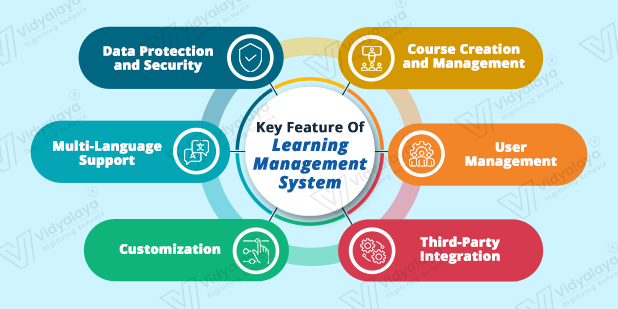
Here are some of the common features that must be present in the features list:
1. Course Creation and Management:
Efficient course creation and management are primary features that one should look into while selecting a Learning Management Software System. It should enable users to create courses, categorize them, enroll users, and create reports quickly so that users don’t waste their valuable time on tasks. The Vidyalaya LMS should automate these types of tasks and should enable course management in a central repository. This central location will store course content, manage user information, change layouts, configure advanced course settings, and create user learning paths.
2. User Management:
There are different types of users of learning management software: teachers, students, and administrators. All of them have different roles and access different information from the LMS. So, the software should differentiate the users and manage their respective roles and grant permissions.
Also, the software should:
- Enable account creation, deletion, and modification
- Bulk user import and user management
- Access privileges management
- Password and other security management
3. Third-party Integrations:
Educational institutes may work with third-party tools and software for different purposes. While selecting a learning management software, one should ensure that the software will work seamlessly with these existing products. The LMS should integrate with other software for offering features like API access, single sign-on (SSO), and authentication.
4. Customization:
Not all educational institutes have the same requirements when it comes to educational content. So, one should look for the degree of customization before finalizing the selection of a learning management system. It should allow users to customize the look and feel, matching their preferences and branding. The system should allow customizing logos and other branding elements, navigation, and menus. This will help them to create a unique learning experience.
5. Multi-language Support:
Educational content is available in different languages, and a learning management software should support multiple languages. It should offer courses to be built in different languages and extend interface elements across different languages. The software should also comply with accessibility standards and support several content formats, like audio, video, transcripts, and text.
6. Data Protection and Security:
A Learning management software system should possess features to ensure integrity, authentication, backups, and confidentiality.
This system should enhance the e-Learning experience with these features and should:
- Encrypt and authenticate
- Should maintain regular backups and data recovery options
- Compliance with data protection policies like FERPA, GDPR
How to Select a Good Learning Management Software?
The educational software market is flooded with all types of software. There are some factors to be considered before investing in good learning management software. They are:
Accessibility and User-Friendly:
An educational institute may have different types of users: proficient and novice. A learning management system should serve both types of users, fulfilling their requirements. The simple accessibility practices can be implemented through single sign-on processes. Also, the home screen should be intuitive and should include everything that the user needs to start the application. Additionally, interactive tools like AI and chatbots should be implemented to guide the users. The system should have been designed in user-friendly fonts and layouts. Also, the content should be able to be translated into other languages.
Data Security:
Learning management information is an asset to the educational institute. So, it becomes a primary concern of protecting this valuable information, user details, and other sensitive data from intruders while selecting a Learning management software. The security technologies implemented in the product must shield all data embedded. Practices like Single Sign-on Process (SSO) are in high demand for securing information behind the security layers, linked to user access rights. If you are looking for a cloud-based application, you need to look for extra security precautions.
Adaptability:
Gone are the days when we used to rely on desktops only for accessing information. Today’s users are flexible with devices like laptops, smartphones, and tablets. So, it becomes mandatory to avail of the learning management software system on different devices so that learners can access their courses and enjoy the freedom of gadget selection. Make sure your selected LMS product is compatible with screen sizes, browsers, and the operating systems of various devices.
Support and Training:
Even after implementation, educational institutes may come across situations where they need live customer support. During the implementation and integration phase of learning management software, you must get the required support from the vendor. So, one should look into the standards of service and support while finalizing the vendor. Also, vendors must provide tutorials or manuals for new users to make the transition easier. Ask about different modes of communication, in case you need to.
Teaching is a very tedious process, and everyone will admit the complexities of the role. After the introduction of technology in the education field, there have been some serious efforts to reduce these complexities. Implementation of Learning Management Software will help you to create an environment where learning is apt with the time and a manageable task for everyone involved. It will come as an aid in reducing the resources by automating workflows and cutting down the frustrations. So, select your LMS provider carefully by keeping the above-mentioned points in mind and make your learning process more effective! For any doubts, we are a call/mail away!