Library Management System Software for Schools
Automate, track, and manage your school library with ease — from book cataloguing and RFID-based circulation to real-time OPAC search and insightful MIS reports.
What Is a School Library Management System?
A School Library Management System (LMS) is software designed to completely automate and manage all in-house operations of a school or college library. It helps librarians maintain a comprehensive database of books, journals, and other resources while keeping accurate records of every transaction — from book issues and return to fine collection and membership management.
Vidyalaya's integrated Library Management System is built specifically for educational institutions. It handles everything from book acquisition and cataloguing to RFID-based tracking, barcode scanning, and cloud-based reporting — all from a single, easy-to-use platform connected directly to your school's ERP.
Beyond day-to-day operations, a robust Library Management System also empowers students and educators with self-service capabilities — such as online book reservations, digital catalogues, and automated overdue notifications — fostering a culture of independent learning. With detailed analytics and usage reports, school administrators can make informed decisions about resource allocation, identify reading trends, and continuously enrich the library's collection to meet the evolving academic needs of their institution.
Key Features of Vidyalaya School Library Management Software
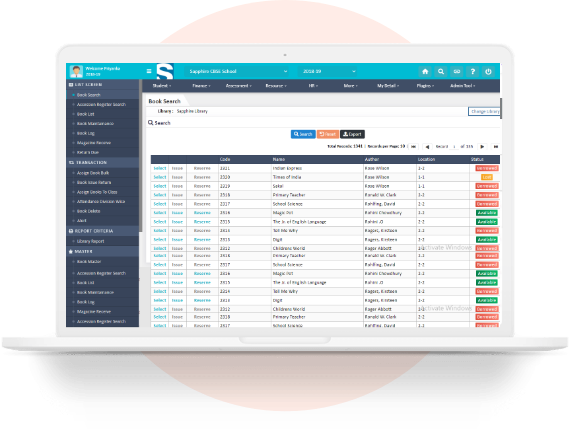

Multi-Library Management
Manage multiple libraries across campuses from one central dashboard. Each library maintains its own catalogue, rules, and reporting.
RFID-Based Book Tracking
Integrate UHF RFID tags with library software for instant, touchless book issues, returns, and inventory verification. Scan entire shelves in minutes.
Barcode & QR Code Integration
Bulk import book data by scanning barcodes. Issue and return books with a single scan — no manual data entry required.
Book Issue, Return & Reserve
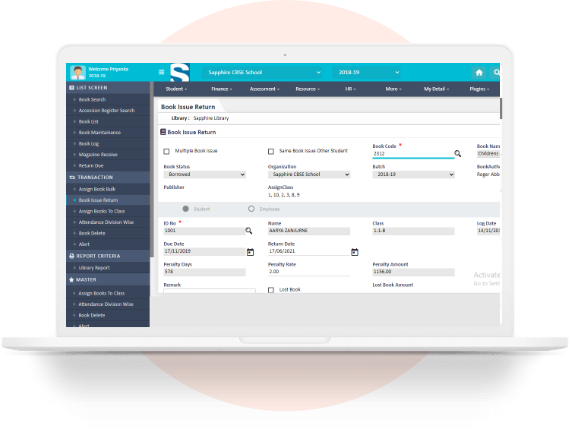
Librarians can issue, accept returns, and allow reservations in a few clicks. Fine collection and due-date alerts are fully automated.
Online Book Availability Check
Students can check if a book is Available, Borrowed, or Reserved in real time via web or mobile app — without visiting the library.
Attendance in Library
Track student visits to the library class-wise, division-wise, and timewise. In-time and out-time are recorded automatically.
Penalty & Fine Management
Define custom fine rules per book type or borrower category. SMS and WhatsApp alerts are sent to parents for overdue reminders.
Cloud-Based Access
All library data is stored securely in the cloud — accessible from any device, anywhere, with automatic backups and zero risk of data loss.
Data Import / Export
Bulk-import existing book catalogues from Excel or CSV. Export any report or data set with one click for offline analysis.
Integration with School ERP
Vidyalaya Library Management is natively integrated with the school's student database, attendance system, fees module, and HR module — no duplicate data entry.
How Vidyalaya's Library Management System Works?
Here is a step-by-step overview of the book lifecycle inside Vidyalaya's system:

Book Acquisition
Librarian selects and purchases books. ISBN is scanned or entered; the system auto-fills title, author, and publisher details from a global database.

Cataloguing
Book is added to the catalogue with subject category, shelf location, number of copies, and availability status. Barcode or RFID tag is assigned.

Member Search (OPAC)
Student searches for the book via OPAC on the school portal or the Vidyalaya mobile app. They check availability and optionally place a reservation.

Book Issue
Student visits the library or uses the self-checkout kiosk. Librarian (or the kiosk) scans the book and student ID. Issue date and due date are logged automatically

Automated Reminder
As the due date approaches, the system sends an SMS or WhatsApp reminder to the student and/or parent. Overdue fines begin accumulating after the due date.

Book Return
Student returns the book. The librarian scans it; the loan is cleared. If a fine is due, it is calculated and added to the student's account.

MIS Reporting
Librarian and management access dashboards and reports: circulation summary, overdue books, top borrowers, inventory status, and budget utilization.
RFID-Based Library Management — The Future of School Libraries
Most school libraries are now moving to RFID (Radio Frequency Identification) technology for library automation. RFID eliminates the need for line-of-sight scanning, speeds up the book circulation process dramatically, and provides an unmatched level of accuracy for inventory management.
How RFID Works in Vidyalaya's Library System?
RFID Tag on Each Book: A unique RFID tag is embedded inside the cover of every book. It stores the book's accession number and is linked to the library software database.
RFID Reader at Circulation Desk: When a book is presented for issue or return, the RFID reader instantly reads the tag and updates the database — no scanning required.
Self-Checkout Kiosk: Students can issue books on their own using a self-service kiosk. They scan their RFID student card, place the books on the reader, and update the system automatically.
Book Drop Station: Students can return books 24x7 using a book drop box placed outside the library. The loan is cancelled immediately, and an SMS receipt is sent.
Anti-Theft Detection Portal: RFID security gates at the library exit trigger an alarm if a book that has not been issued passes through — protecting your collection at all times.
Shelf Management & Stock Verification: A handheld RFID reader lets librarians walk through the shelves and verify stock without removing a single book. Verify up to 1,00,000 books per day.
Why Schools Are Switching to RFID Library Systems?
Eliminate manual barcode scanning — RFID reads multiple books simultaneously
Free librarian time for student-facing activities instead of data entry
Conduct complete stock verification in hours instead of weeks
Instantly locate a misplaced book on the shelf using a handheld reader
Prevent book theft with gate-level security detection
rovide students with a self-service, modern library experience

Years Legacy
Satisfied Clients
Client Retention
Reports
Professionals Trained
Modules of Vidyalaya Library Management System Software
Our library automation software is structured into six specialized modules, each managing a critical aspect of daily library operations

Integration With Vidyalaya School ERP
Unlike standalone library software, Vidyalaya's Library Management System is natively integrated with the complete school ERP. This means:
Student database is shared — no duplicate entry of student details in the library system
Unpaid library fines appear automatically in the student's fees ledger
Library attendance integrates with the school's main attendance module
Parent notifications go through the same SMS/WhatsApp channel used for fees and attendance
Management gets a unified dashboard — academic, financial, and library data in one view

Features
Discover Our Specialized Features
Explore the core features that power educational institutions worldwide. Vidyalaya’s robust suite covers everything from School Management and LMS to Library and Attendance systems—all under one intelligent platform.


Benefits of Vidyalaya School Library Management Software

What's New?
Find Latest Technology News, Blogs & More.
Top 5 Reasons to Implement Library Management System in Educational Institutes
A library is the delivery room for the birthplace of ideas, a place where history comes to life!” quotes like these inspire students ...
Get more details
Key Features of School Library Management Software that you need to know
Libraries are evolving to fit into an increasingly digital environment as technology transforms our lives in various ways. Library management systems ...
Get more details
Top Advantages of Library Management System
The librarian has to look after thousands of books kept in the library and also for multiple processes done in the library. To issue, return, reserve, and keep maintenance of the book...
Get more detailsFrequently Asked Questions On School Portal
1. What does a Library Management System do for schools?
A Library Management System (LMS) automates all daily library operations — book cataloguing, issue and return tracking, fine calculation, OPAC search, and MIS reporting. It eliminates manual register-based management and gives librarians real-time control over the entire book inventory.
2. What is OPAC and why does a school library need it?
OPAC stands for Online Public Access Catalogue. It is a digital catalogue that allows students, teachers, and parents to search the library's entire collection from any device — by entering a book title, author name, subject, or keyword. It saves time for both students and librarians and encourages more frequent library use.
3. What is an RFID library system and how is it different from barcode?
An RFID (Radio Frequency Identification) system uses wireless electronic tags on books that can be read without direct line of sight or manual scanning. Unlike barcodes (which require individual scanning of each book), RFID can read multiple books simultaneously, enable self-checkout kiosks, powers anti-theft gates, and allows shelf inventory verification in hours. It is significantly faster and more accurate than barcode-only systems.
4. Does Vidyalaya's library software work on mobile phones?
Yes. Vidyalaya offers M-OPAC — a mobile library search feature available through the Vidyalaya School App on Android and iOS. Students can search the library catalogue, check book availability, view their borrowing history, and receive due-date reminders directly on their smartphones.
5. Can the library software send reminders for overdue books?
Yes. Vidyalaya's library system sends automated SMS and WhatsApp reminders to students and parents as the due date approaches and after it has passed. Fine amounts are calculated automatically based on pre-configured rules and can be added directly to the student's fees account.
6. Is the library data stored securely?
Yes. All library data is stored on secure cloud servers with encrypted databases, role-based access controls (only authorized users can access sensitive records), and regular automated backups. Data is safe even in the event of local hardware failure.
7. Can Vidyalaya manage multiple libraries across different campuses?
Yes. Vidyalaya's Multi-Library Management feature allows schools with multiple campuses or branch libraries to manage all libraries from a single platform. Each library maintains its own catalogue, rules, and reports, while management gets a consolidated view across all branches.
8. How does the library system integrate with the school's existing ERP?
Vidyalaya Library Management is not a standalone product — it is a native module within the Vidyalaya School ERP. It shares the student database, parent communication channels, fees ledger, and attendance module. This means zero duplicate data entry and a completely unified school management experience.
9. What reports can be generated from the library management system?
The system generates over 50 library-specific reports including: book circulation summary, overdue books with borrower details, subject-wise borrowing trends, top borrowed titles, fine collection summary, inventory and stock verification reports, new acquisition logs, and budget utilization reports.
10. How do I get started with Vidyalaya's Library Management System?
You can request a free demo by visiting the Vidyalaya website or calling our team. Our education ERP consultants will walk you through the library module, help assess your library's needs (barcode vs RFID), and guide you through onboarding — including data migration from your existing system.
Ready to Transform Your School Library?
Call Now